8.6.1. CSS3 background 
Several new background attributes are included in CSS3 to provide greater control over background elements.
In this chapter you will learn about the following background properties:
Background-image
Background-size
Background-origin
Background-clip
You will also learn how to use multiple background images.
8.6.2. Browser support 
The number in the table represents the first browser version number that supports the property.
The number immediately before-webkit-,-ms- or-moz- is the first browser version number that supports the prefix attribute.
Attribute | |||||
|---|---|---|---|---|---|
Background-image (with multiple backgrounds) | 4.0 | 9.0 | 3.6 | 3.1 | 11.5 |
Background-size | 4.0 1.0-webkit- | 9.0 | 4.03.6-moz- | 4.1 3.0-webkit- | 10.5 10.0-o- |
Background-origin | 1.0 | 9.0 | 4.0 | 3.0 | 10.5 |
Background-clip | 4.0 | 9.0 | 4.0 | 3.0 | 10.5 |
8.6.3. CSS3
background-image
attribute 
In CSS3, you can use the
background-image
property to add a background picture.
Different background images and images are separated by commas, and the first one is shown at the top of all the pictures.
Example
#example1 {
    background-image: url(img_flwr.gif), url(paper.gif);
    background-position: right bottom, left top;
    background-repeat: no-repeat, repeat;
}
You can set multiple different properties for different pictures
Example
#example1 {
    background: url(img_flwr.gif) right bottom no-repeat, url(paper.gif) left top repeat;
}
8.6.4. CSS3
background-size
attribute 
background-size
specifies the size of the background image. Before CSS3,the size of the background image was determined by the actual size of the image.
You can specify the background image in CSS3, so let’s re-specify the size of the background image in different environments. You can specify a pixel or percentage size.
The size you specify is a percentage of the width and height of the parent element.
Example 1
Reset the background image:
div
{
    background:url(img_flwr.gif);
    background-size:80px 60px;
    background-repeat:no-repeat;
}
Example 2
The extended background image fully fills the content area:
div
{
    background:url(img_flwr.gif);
    background-size:100% 100%;
    background-repeat:no-repeat;
}
8.6.5. CSS3’s
background-origin
attribute 
background-origin
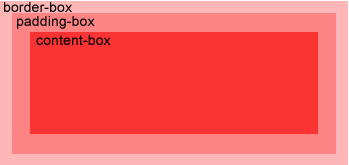
property specifies the location area of the backgroundimage.
Background images can be placed in content-box, padding-box, and border-box areas.
Example
In
content-box
locate the background picture in:
div
{
    background:url(img_flwr.gif);
    background-repeat:no-repeat;
    background-size:100% 100%;
    background-origin:content-box;
}
8.6.6. CSS3 multiple background images 
CSS3 allows you to add multiple background images to an element.
Example
Set up two background images in the body element:
body
{
    background-image:url(img_flwr.gif),url(img_tree.gif);
}
8.6.7. CSS3 background-clip attribute 
In CSS3
background-clip
the background clipping property is drawn from the specified location.
Example
#example1 {
    border: 10px dotted black;
    padding: 35px;
    background: yellow;
    background-clip: content-box;
}
8.6.8. New background attribute 
Sequence | Description | CSS |
|---|---|---|
Background-clip | Specifies the drawing area of the background. | 3 |
Background-origin | Specify the location area of the background picture. | 3 |
Background-size | Specify the size of the background picture. | 3 |