Calculation attribute keywords:
computed
.
Computational attributes are useful when dealing with some complex logic.
Take a look at the following example of reversing a string: In example 1, the template becomes very complex and not easy to understand. Next, let’s take a look at an example that uses calculated properties: A calculation property is declared in example 2 The function provided will be used as a property We can use It can be said to use Judging from the running results of the instance, when running vm.site = ‘rookie tutorial http://www.runoob.com ’; 2.11.1. Example 1 
<divid="app">{{ message.split('').reverse().join('') }}</div>
2.11.2. Example 2 
<!DOCTYPEhtml><html><head><metacharset="utf-8"><title>Vue Test Example -
Rookie Tutorial(runoob.com)</title><scriptsrc="https://unpkg.com/vue@next"></script></head><body><divid="app"><p>Original String:
{{ message }}</p><p>Invert string after calculation: {{ reversedMessage
}}</p></div><script>const app = { data() { return { message: 'RUNOOB!!'
} }, computed: { // Calculating attributes getter reversedMessage: function () { //
\`this\` Point to vm instance return this.message.split('').reverse().join('') }
} } Vue.createApp(app).mount('#app')</script>
reversedMessage
.
vm.reversedMessage
of
getter
.
vm.reversedMessage
depend on
vm.message
in
vm.message
when there is a change
vm.reversedMessage
will also be updated.Computed vs methods 
methods
to replace
computed
both of them are the same in effect, but
computed
is based on its dependency cache and will only be re-valued when the dependency changes. And use
methods
when re-rendering, the function is always called again to execute 2.11.3. Example 3 
methods:{reversedMessage2:function(){returnthis.message.split('').reverse().join('')}}
computed
performance will be better, but if you don’t want caching, you can use the
methods
property.Computed setter 
computed
property defaults to only
getter
but you can also provide one when needed
setter
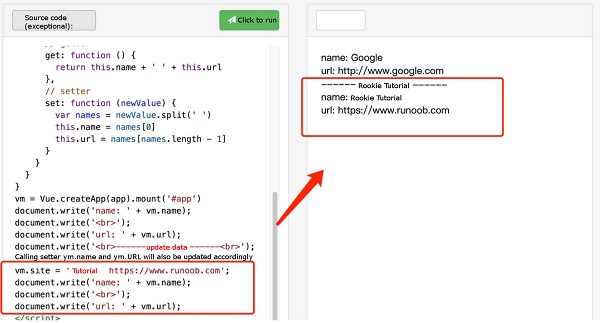
: 2.11.4. Example 4 
varvm=newVue({el:'#app',data:{name:'Google',url:'http://www.google.com'},computed:{site:{//getterget:function(){returnthis.name+''+this.url},//setterset:function(newValue){varnames=newValue.split('')this.name=names[0]this.url=names[names.length-1]}}}})//call
setter, vm.name and vm.url will also be updated accordingly with vm. site='Rookie Tutorial'
http://www.runoob.com';document.write('name:'+vm.name);document.write('<br>');document.write('url:'+vm.url);
setter
will be called.
vm.name
and
vm.url
will also be updated accordingly.