The array provided in the Scala language is used to store fixed-size elements of the same type, and the array is one of the important data structures for every editing language.
Declaring an array variable is not a declaration
number0
、
number1
、
...
、
number99
individual variables, but declare a variable likenumbers, and then use the
numbers[0]
、
numbers[1]
、…、
numbers[99]
to represent individual variables. A specified element in the array is accessed by index.
The first element index of the array is 0, and the index of the last elementis the total number of elements minus 1. The following is the syntax format of the Scala array declaration: In the above syntax, z declares an array of string type, which is 3 in length and can store 3 elements. We can set a value for each element and access each element through an index, as follows: The index of the last element uses the expression 4ax 2 as the index, similar to We can also define an array in the following ways: The following figure shows an array of length 10 The element type and size of the array are determined, so when dealing with array elements, we usually use the basic The following example demonstrates the process of creating and initializing an array: Execute the above code, and the output is as follows: Multidimensional array the value in one array can be another array, and the value of another array can also be an array. Matrices and tables are our common two-dimensional arrays. The above is an example that defines a two-dimensional array: The array in the instance contains three array elements, each with three values. Next, let’s look at a complete example of two-dimensional array processing: Execute the above code, and the output is as follows: In the following example, we use the Execute the above code, and the output is as follows: In the following example, we use the Execute the above code, and the output is as follows: The following table is an important way to deal with arrays in the Scala language, and we need to use it before using it Serial number Method and description 1 Creates an array of specified objects T, whose values can be Unit, Double, Float, Long, Int, Char, Short, Byte, Boolean. 2 Merge array 3 Copy one array to another. Equivalent to Java’s System.arraycopy (src, srcPos, dest, destPos, length). 4 Returns an array of length 0 5 Returns an array of the specified length, with each array element being the return value of the specified function. The initial value of the above instance array is 0, the length is 3, and thecalculation function is a = > axi1: 6 Returns an array with the length specified by the first parameter and each element populated with the second parameter. 7 Returns a binary array with the length specified by the first parameter and each element populated with the second parameter. 8 Create an array of specified length 9 Create a 2D array 10 Create a 3D array 11 Create an array within the specified range, with step as the step between each element 12 Create an array within a specified interval 13 Returns an array of specified length, with each array element being the return value of the specified function, starting at 0 by default. The above example returns three elements: 14 Returns a two-dimensional array of the specified length, with each array element being the return value of the specified function, starting at 0 by default. 8.28.1. Declare array #
var z:Array[String] = new Array[String](3)

or

var z = new Array[String](3)
z(0) = "Runoob"; z(1) = "Baidu"; z(4/2) = "Google"
      z(2)
      =
      "Google"
.var z = Array("Runoob", "Baidu", "Google")
myList
the index values are 0 to 9: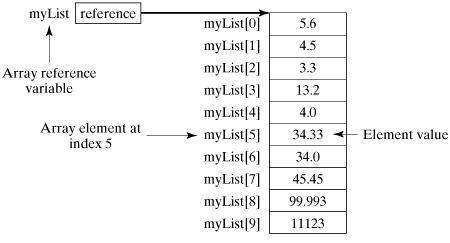
8.28.2. Processing array #
for
Cycle.Example #
object Test {
   def main(args: Array[String]) {
      var myList = Array(1.9, 2.9, 3.4, 3.5)

      // Output all array elements
      for ( x <- myList ) {
         println( x )
      }
      // Calculate the sum of all elements in an array
      var total = 0.0;
      for ( i <- 0 to (myList.length - 1)) {
         total += myList(i);
      }
      println("The total is " + total);
      // Find the largest element in an array
      var max = myList(0);
      for ( i <- 1 to (myList.length - 1) ) {
         if (myList(i) > max) max = myList(i);
      }
      println("The maximum value is" + max);

   }
}
$ scalac Test.scala
$ scala Test
1.9
2.9
3.4
3.5
The total is 11.7
The maximum value is3.5
8.28.3. Multidimensional array #
val myMatrix = Array.ofDim[Int](3, 3)
Example #
import Array.\_
object Test {
   def main(args: Array[String]) {
      val myMatrix = Array.ofDim[Int](3, 3)

      // Create Matrix
      for (i <- 0 to 2) {
         for ( j <- 0 to 2) {
            myMatrix(i)(j) = j;
         }
      }

      // Print a 2D array
      for (i <- 0 to 2) {
         for ( j <- 0 to 2) {
            print(" " + myMatrix(i)(j));
         }
         println();
      }

   }
}
$ scalac Test.scala
$ scala Test
0 1 2
0 1 2
0 1 2
8.28.4. Merge array #
concat()
method to merge two arrays
concat()
multiple array parameters are accepted in theExample #
import Array.\_
object Test {
   def main(args: Array[String]) {
      var myList1 = Array(1.9, 2.9, 3.4, 3.5)
      var myList2 = Array(8.9, 7.9, 0.4, 1.5)
      var myList3 =  concat( myList1, myList2)

      // Output all array elements
      for ( x <- myList3 ) {
         println( x )
      }
   }
}
$ scalac Test.scala
$ scala Test
1.9
2.9
3.4
3.5
8.9
7.9
0.4
1.5
8.28.5. Create an interval array #
range()
method to generate an array within an interval. The
range()
last parameter of the method is the step size, which defaults to 1:Example #
import Array.\_
object Test {
   def main(args: Array[String]) {
      var myList1 = range(10, 20, 2)
      var myList2 = range(10,20)
      // Output all array elements
      for ( x <- myList1 ) {
         print( " " + x )
      }
      println()
      for ( x <- myList2 ) {
         print( " " + x )
      }
   }
}
$ scalac Test.scala
$ scala Test
10 12 14 16 18
10 11 12 13 14 15 16 17 18 19
8.28.6. Scala array method #
      import
      Array._
introduce the package.
           def
           apply(
           x:
           T,
           xs:
           T*
           ):
           Array[T]
           def
           concat[T](
           xss:
           Array[T]*
           ):
           Array[T]
           def
           copy(
           src:
           AnyRef,
           srcPos:
           Int,
           dest:
           AnyRef,
           destPos:
           Int,
           length:
           Int
           ):
           Unit
           def
           empty[T]:
           Array[T]
           def
           iterate[T](
           start:
           T,
           len:
           Int
           )(
           f:
           (T)
           =>
           T
           ):
           Array[T]
scala> Array.iterate(0,3)(a=>a+1)
res1: Array[Int] = Array(0, 1, 2)
           def
           fill[T](
           n:
           Int
           )(elem:
           =>
           T):
           Array[T]
           def
           fill[T](
           n1:
           Int,
           n2:
           Int
           )(
           elem:
           =>
           T
           ):
           Array[Array[T]]
           def
           ofDim[T](
           n1:
           Int
           ):
           Array[T]
           def
           ofDim[T](
           n1:
           Int,
           n2:
           Int
           ):
           Array[Array[T]]
           def
           ofDim[T](
           n1:
           Int,
           n2:
           Int,
           n3:
           Int
           ):
           Array[Array[Array[T]]]
           def
           range(
           start:
           Int,
           end:
           Int,
           step:
           Int
           ):
           Array[Int]
           def
           range(
           start:
           Int,
           end:
           Int
           ):
           Array[Int]
           def
           tabulate[T](
           n:
           Int
           )(f:
           (Int)=>
           T):
           Array[T]
scala> Array.tabulate(3)(a => a + 5)
res0: Array[Int] = Array(5, 6, 7)
           def
           tabulate[T](
           n1:
           Int,
           n2:
           Int
           )(
           f:
           (Int,
           Int
           )
           =>
           T):
           Array[Array[T]]